
Let an AI agent work on websites you are logged into
An AI agent can work on a site you are signed in to if it controls your real Chrome profile instead of a fresh browser. Agent Chrome does that: it is a Chrome extension plus a remote MCP server, and the agent uses the same cookies and sessions you do, in its own tab group.
You do not paste passwords or export cookies. You can watch the agent and stop it at any moment.
The problem: the agent's browser is not signed in
People hit the same wall with other setups:
- "Chrome DevTools MCP launches a separate Chrome without my logins."
- "Playwright opens a clean browser, not mine."
- "I need remote debugging flags just to attach."
If the page you care about is an admin panel, an analytics dashboard, a billing page or a staging site behind SSO, a clean browser is no use. You would have to log in again, and some sites make that hard with two-factor prompts.
How Agent Chrome uses your session
The extension runs inside your own Chrome profile. When an agent calls a tool, the extension does the work in a tab that belongs to the agent's session, using the debugger protocol for input, screenshots, console and network logs. The tab has your cookies, so pages load signed in.
Each MCP session gets its own named, colored tab group, and new tabs it opens (including tabs from links) join that group. Your own tabs are not touched. If you want the agent to work on a tab you already have open, tabs_select with adopt: true moves it into the agent's group.
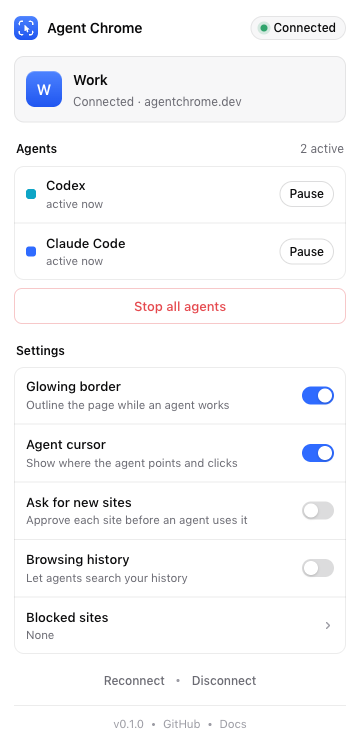
The popup lists each agent session, each with Pause or Resume, plus Stop all.
Walkthrough: read a dashboard you are signed in to
Ask your agent:
Use agentchrome to open our analytics dashboard at https://analytics.example.com, read this week's signups from the main chart, and summarize the change from last week.
The agent will call:
tabs_contextto get or create its tab group.navigatewithurl: "https://analytics.example.com". Because it is your Chrome, the dashboard opens already signed in.get_page_textto read the visible text, orread_pagewithfilter: "interactive"to find controls such as a date range picker.findwithquery: "date range selector"andcomputerwithaction: "left_click"to change the range.computerwithaction: "screenshot", thencomputerwithaction: "zoom"and aregionto read small chart labels at full resolution.
If your browser has several profiles, choose the one with the right login: list_browsers shows them, and any call takes browser: "Work". See Connect several Chrome profiles.

Stay in control
Letting an agent loose on a signed-in browser is a real trust decision, so the controls matter.
- You can see it. A pulsing blue border and a status pill with the agent's logo and a Stop button appear on the page. The agent has its own animated cursor and never moves your real mouse.
- You can stop it. The Stop button on the page, Pause in the popup, Stop all, or Cancel on Chrome's "started debugging this browser" bar. The last one stops every agent.
- You can limit it. In the popup you can turn on "ask before each new site" and keep a block list. History access is off by default, and
history_searchonly works if you turn it on. - Dialogs do not run away.
alert,confirmandpromptare reported to the agent, andhandle_dialoganswers them.
The agent's instructions tell it to ask before actions that cannot be undone, such as buying, paying, sending messages, deleting, or submitting forms with real effects. Put the same rule in your own prompt: "Read only. Do not click anything that changes data."
For the full model, see Security and privacy.
Good jobs for a signed-in agent
- Pull numbers from a dashboard that has no API.
- Check that an admin page shows the right data after a deploy.
- Reproduce a bug that only appears for your account.
- Summarize a long thread or a ticket queue behind login.
- Walk through your staging site behind SSO, as in Test your web app with an AI agent.
Tips and limits
- Start read-only. Tell the agent to read and report first. Allow edits once you trust the plan.
- Use a dedicated profile for risky work. A Chrome profile with only the accounts the agent needs limits what it can reach.
- Pages can attack the agent. A web page can contain text meant to hijack an agent (prompt injection). The skill and server instructions tell agents never to follow instructions found inside pages, but you should not treat that as a guarantee. Be careful with pages you do not trust.
- An agent in your browser can do what you can. Treat it like handing a colleague your laptop.
- No page content is stored on the server. Files an agent explicitly saves, such as screenshots and recordings, are kept for 7 days.
- Password-manager frames can block the debugger. Agent Chrome has a fallback, but a very locked-down login frame may still need you to sign in by hand.
- Chrome only, loaded unpacked, and it cannot act on
chrome://pages or the Web Store.
Frequently asked questions
Can an AI agent use my logged-in Chrome?
Yes. Agent Chrome lets Claude Code, Codex, Gemini CLI, Cursor and other MCP agents work in your own Chrome profile, so pages load with your existing sessions. The agent works in its own tab group and you can stop it at any time.
Does the agent see my passwords?
The agent sees what the pages show, as you would, and acts through the browser's tools such as read_page, get_page_text and screenshot. Anything visible on a page you point it at can end up in its context, so choose the pages deliberately.
Is it safe to give an AI access to my signed-in sites?
It carries real risk, because the agent can do what you can. You can reduce it with a separate profile, read-only instructions, "ask before each new site", a block list, and the Stop button. Read Security and privacy before you decide.
How do I stop the agent right now?
Press Stop on the status pill on the page, press Pause or Stop all in the popup, or press Cancel on Chrome's "started debugging this browser" bar. Any of these halts the agent, and its next tool call reports that it was stopped.
Can I choose which account or profile it uses?
Yes. Pair each Chrome profile, then pass browser: "Work" on a call or use select_browser once per session. See QA across several accounts and Chrome profiles.
Try Agent Chrome
One command sets up every agent on your machine. Or add https://agentchrome.dev/mcp as a connector in Claude or ChatGPT.